
iPhone Duo
iPhone Duo camera guide: where each camera is and which to use for video.
The iPhone Duo camera system is four cameras: a 48MP Main and a 48MP Ultra Wide on the back, a 12MP Center Stage camera in the outer screen, and an under-display camera beneath the inner screen. For the best video, use the rear Main camera (4K up to 120 fps); for 4K while you watch yourself, the outer front camera; for hands-free half-folded clips and calls, the inner camera at 1080p.
Get it the day it launches
One email when it's on the App Store. No spam.
Published
By Steve Delarwelle · Updated
Where the iPhone Duo cameras are
Most phones have one front camera and a cluster on the back. A foldable needs a front camera on each screen, so iPhone Duo spreads its cameras across three surfaces:
- The back. Two cameras on the outer shell. Apple's tech specs call it the 48MP Dual Fusion system: a 26 mm Main and a 13 mm Ultra Wide. MacRumors notes the rear cameras are "the thickest things in the whole phone."
- The outer screen. The 12MP Center Stage camera sits in the 5.4-inch cover display, so it faces you whenever the phone is closed.
- The inner screen. The FaceTime camera hides under the 7.6-inch folding display. It isn't in the top corner; MacRumors, citing a leaker, says that's down to "engineering difficulties." In 9to5Google's hands-on, the area over the camera doesn't have the matte finish of the rest of the screen, which makes it easier to spot than Apple's renders suggested.
Every iPhone Duo camera at a glance
Lens and video figures are from Apple's iPhone Duo tech specs.
| Camera | Where it is | Lens | Video | Use it for |
|---|---|---|---|---|
| 48MP Fusion Main (rear) | Back of the phone, on the outer shell | 26 mm, ƒ/1.6, sensor-shift stabilization; optical-quality 2x crop (52 mm) | 4K Dolby Vision up to 120 fps; Cinematic up to 4K 60 | Best picture: YouTube, B-roll, selfies framed on the outer screen |
| 48MP Fusion Ultra Wide (rear) | Back of the phone, beside the Main camera | 13 mm, ƒ/2.2, 120° field of view | 4K Dolby Vision up to 60 fps | Rooms, products up close, walk-and-talk vlogs |
| 12MP Center Stage (outer front) | In the 5.4-inch outer screen | ƒ/2.2, Center Stage framing | 4K Dolby Vision at 24 to 60 fps | 4K talking heads when you want to see yourself |
| Under-display FaceTime (inner) | Under the 7.6-inch inner screen, not in the corner | ƒ/1.8 | 1080p at 30 or 60 fps | Video calls, half-folded social clips, reading a script |
Which iPhone Duo camera to use for each kind of video
- YouTube talking head (4K): the rear Main camera if someone else frames the shot or you're happy checking framing on the outer screen; otherwise the outer front camera, which records 4K at up to 60 fps.
- TikTok, Reels and Shorts: the inner camera, half-folded on a desk. 1080p at 60 fps is plenty for vertical video, and you get the big screen to look at. The details are in how to record with iPhone Duo half-folded.
- Product demos and unboxings: the rear cameras. They record macro video, and the Main camera's 2x crop keeps a product sharp without moving the phone closer.
- Walk-and-talk vlogs: the rear cameras with Action mode (up to 2.8K at 60 fps), using the outer screen to keep yourself in frame. PhotoWorkout points out that the outer display "works as a live viewfinder" for selfies and vlogs with the rear cameras.
- Video calls: the inner camera. Apple pitches it for FaceTime and supports Center Stage on calls; Android Authority expects under-display cameras to trail regular ones on stills, so don't rely on it for photos.
- Your face and what you're showing, together: Dual Capture records the outer front and rear cameras at once, up to 4K at 30 fps.
Features that only make sense on a foldable
Apple's iPhone Duo page says the phone "can stand on its own" for hands-free video, so you can skip the tripod for most desk shots. Duo Preview shows a live preview on the outer screen while you shoot with the rear cameras, which is how you frame a rear-camera selfie. Tom's Guide's hands-on also mentions Smart Take, which lets you prop the phone up and have it take photos when everyone is in focus.
One limit to plan around: the 4K cameras and the big screen are on different sides of the phone. If you film with the rear or outer cameras, the screen you can see is the small 5.4-inch one.
Front and back cameras in one take
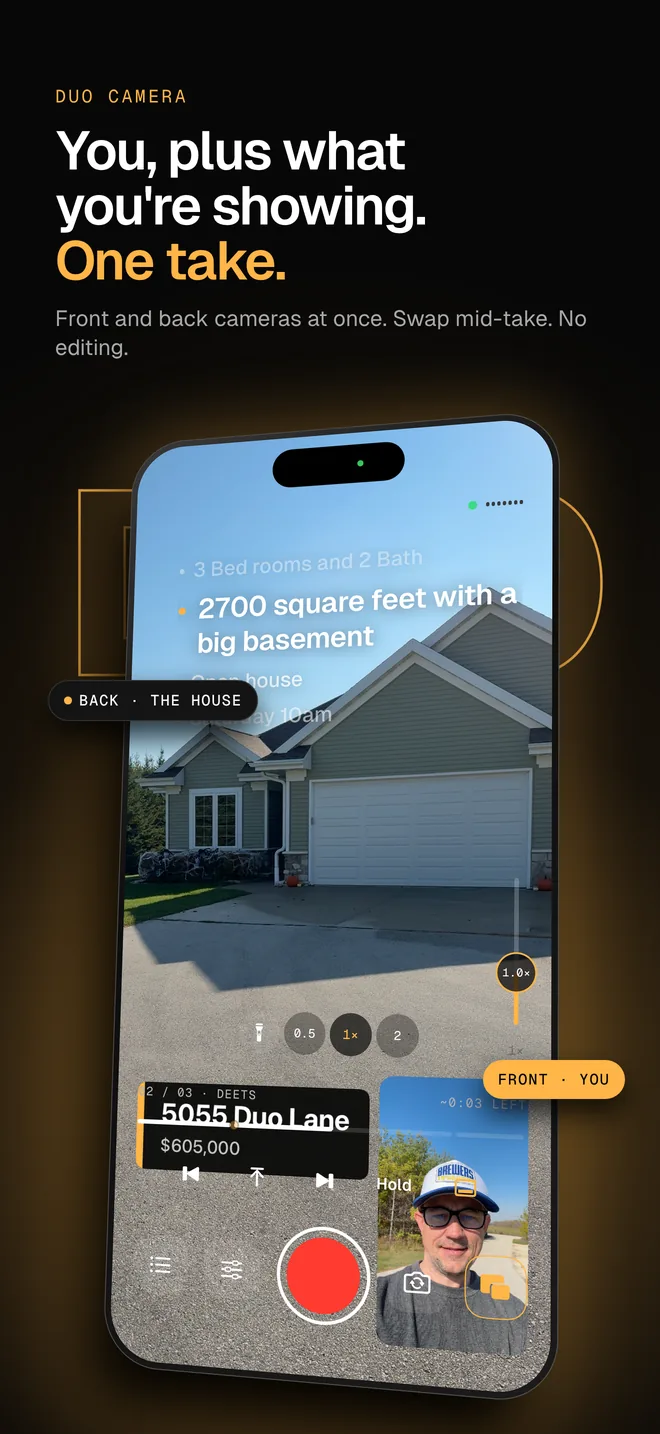
You don't have to pick one camera. DuoPrompt's Duo Camera records the front and back cameras at the same time, with your script on screen: what you're showing fills the frame and you sit in a picture-in-picture, in one finished video. Tap Swap mid-take to flip which camera is big. It works on iPhone Duo and any iPhone XS or later (Pro).
Set up the right camera in five steps
- 01
Decide where the video will be posted
TikTok, Reels and Shorts compress everything, so 1080p is enough. A YouTube video or anything you'll crop in an editor benefits from 4K, which rules out the inner camera.
- 02
Pick the camera from the table
Rear Main for the best picture, outer front for 4K while watching yourself, inner for hands-free half-folded clips and calls.
- 03
Set the video format
Open Settings, then Camera, then Record Video, and choose the resolution and frame rate. 4K at 30 fps is a safe default for talking to camera; 60 fps only if you need smooth motion.
- 04
Fold the phone to match the camera
Inner camera: half-fold it on a desk with the inner screen facing you. Outer front camera: stand it with the outer screen facing you. Rear cameras: turn the back toward you and use the outer screen to check your framing.
- 05
Shoot a 10-second test and play it back
Check that your eyes are in focus, the exposure looks right and the audio is clear before the real take. Wipe the lens first: unfolding the phone puts fingerprints near every camera.
Reading a script with the iPhone Duo camera
None of the cameras show text while you record; the Camera app shows a viewfinder. If you talk from a script, the inner camera has the advantage: half-folded, the upright half holds the camera, so words placed on that half sit right beside the lens.
DuoPrompt is built for that. On iPhone Duo it splits the screen on the fold, puts the script next to the front camera and moves the controls to the flat half. The free plan includes the iPhone Duo layout with manual scrolling, 1 saved script and 30-second takes. Pro adds voice-follow scrolling and Duo Camera, which records the front and back cameras in one take.
Related guides
Read your script beside the camera
DuoPrompt is coming soon to the App Store. Join the launch list and we'll email you the day it's free to download.
One email at launch. No spam.
iPhone Duo camera questions
How many cameras does iPhone Duo have?
Four. Two on the back (a 48MP Fusion Main and a 48MP Fusion Ultra Wide), a 12MP Center Stage camera in the outer screen, and an under-display FaceTime camera under the inner screen.
Does iPhone Duo have a telephoto camera?
Not a separate lens. Apple lists a 12MP "optical-quality" 2x telephoto, which is a crop from the 48MP Main sensor, and digital zoom up to 10x for photos and 6x for video. Tom's Guide's hands-on describes the rear system as just a wide and an ultrawide.
Can the iPhone Duo inner camera record 4K?
No. Apple's specs list the under-display inner camera at 1080p, 30 or 60 fps. For 4K selfie video use the 12MP outer front camera (up to 4K at 60 fps) or the rear cameras.
Can I film myself with the rear cameras on iPhone Duo?
Yes. The outer screen can show a live preview while the rear cameras face you; Apple calls this Duo Preview. It gives you the best image quality, but leaves only the small outer screen to look at.
Can iPhone Duo record the front and back cameras at the same time?
Yes. Apple lists Dual Capture for the outer front and rear cameras, up to 4K Dolby Vision at 30 fps. DuoPrompt Pro's Duo Camera also records both in one take, with your script on screen.