
Build it
How to make a DIY teleprompter
A DIY teleprompter is a pane of glass held at 45 degrees over a phone or tablet that shows your script mirrored, with a camera filming through the glass from behind. You can build one from a cardboard box, a picture frame and some black tape in an afternoon. Below: what each kind of build costs, how big the glass needs to be, why plain glass shows double, and a 7-step build.
Get it the day it launches
One email when it's on the App Store. No spam.
Published
By Steve Delarwelle · Updated
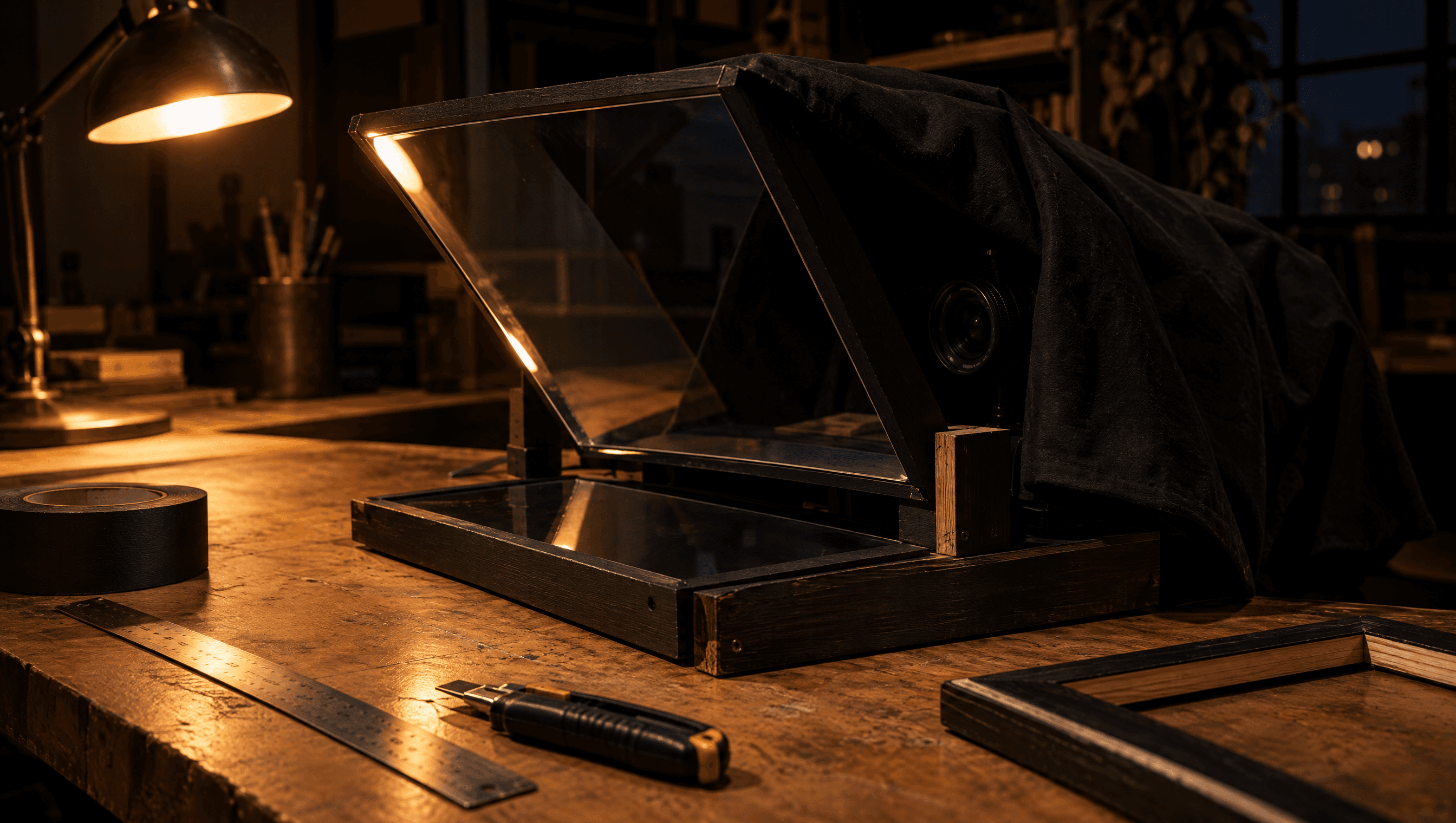
How a homemade teleprompter works
Every teleprompter, from a $10 box to a broadcast rig, uses the same trick. The screen lies face-up. A sheet of glass leans over it at about 45 degrees, so you see the script reflected in the glass while looking straight ahead. The camera sits behind the glass and films through it, so the words float right in front of the lens and your eyes stay on it. If you want the longer explanation, see how a teleprompter works.
That means a DIY build has only three jobs: hold the glass at the right angle, keep stray light out, and get the text to read the right way round. Everything else is cardboard.
Four ways to get a teleprompter, compared
Prices as listed by the sellers on November 6, 2026. They change, so check before you buy.
| Option | Cost | Good | Catch |
|---|---|---|---|
| Box + picture-frame glass | Around $10 if you have the screen (Instructables’ box build) | Cheapest, about 20 minutes | Plain glass shows a faint double image (ghosting) |
| Box + beam-splitter glass | Glass samples from $9.95 (4×4 or 6×6 in); larger pieces priced by size | Clean, bright single reflection | Not tempered; scores and breaks like normal glass |
| Buy a ready-made rig | NEEWER lists rigs from $119.99 (X12B) to $259.99 (X14) | Hood, mounts and beam-splitter glass included | Costs ten times a box build |
| No glass: an app beside the lens | Free apps exist | Nothing to build; one device does both jobs | Your eyes sit just below the lens, not in it |
Sources: Instructables' $10 box teleprompter, TwoWayMirrors teleprompter glass and NEEWER's teleprompter range.
Picture-frame glass vs beam-splitter glass
Ordinary glass reflects from both of its surfaces, so each word shows up twice, one copy slightly offset from the other. That's ghosting. It's readable for short scripts, especially with large, bold text, but it gets tiring. Beam-splitter glass fixes it: the front is partly mirrored and, as TwoWayMirrors explains, the back has an anti-reflective coating that “prevents ghosting.”
Beam-splitter glass is sold by how much light it lets through and reflects. 70/30 (70% to the camera, 30% to you) is the common rig standard, and NEEWER describes it as the glass teleprompters use. 60/40 reflects a bit more, so the text is easier to read, for a slightly darker picture. Thickness runs from 2 to 4 mm; the thicker glass is stronger. TwoWayMirrors notes its glass isn't tempered and breaks like normal glass, so tape the edges.
How big the glass needs to be
At 45 degrees, the glass has to be about 1.41 times as long as the stretch of screen you want to see in it (it's the diagonal of a square). Make it at least as wide as the screen.
| Screen length to show | Glass length at 45° |
|---|---|
| 4 in (part of a phone screen) | About 5.7 in |
| 6 in (most of a phone screen) | About 8.5 in |
| 8 in (a small tablet) | About 11.3 in |
| 10 in (a large tablet) | About 14.1 in |
You rarely need the whole screen: four or five lines of large text is plenty to read from. A small glass over a phone is fine if the app keeps the current line in the middle.
How to make a DIY teleprompter in 7 steps
Based on the box build in MakeUseOf's DIY teleprompter guide and the glass tips from TwoWayMirrors. Allow about an hour.
- 01
Pick the screen and the camera
You need two devices: one lies face-up and shows the script, the other films through the glass. A phone or tablet makes a good screen; the camera can be a second phone, a webcam or a camera. One phone can't do both, because its screen faces the glass while its camera would need to look through it.
- 02
Get the glass
Use a picture-frame pane to test the idea, or a piece of beam-splitter glass for a clean result. Make it at least as wide as the screen and about 1.4 times as long as the part of the screen you want to read, because it sits at an angle.
- 03
Build the box
Cut a base from cardboard, foam board or thin wood slightly bigger than the screen. Cut two side panels with a diagonal edge at 45 degrees so the glass leans back from you over the screen, and glue them to the base.
- 04
Cut the camera hole and black out the inside
Close the back with a panel and cut a hole only as big as the lens, so light can't leak in. Paint or tape the inside black. If you use beam-splitter glass, mask the back of it in black everywhere except where the camera looks through.
- 05
Fit the glass, coated side toward the screen
Seat the glass on the 45-degree edges, coated side facing down toward the screen. To find the coated side of beam-splitter glass, touch it with a fingernail: on the coated side there's no visible gap between the nail and its reflection.
- 06
Add a hood
Drape black cloth over the back of the box and around the camera so nothing behind you reflects in the glass and the lens sees only through it.
- 07
Mirror the text and test
Turn on mirror text in your teleprompter app so the reflection reads the right way round. Use white text on a black background, set the brightness high, and record a 20-second test to check for glare, ghosting and eyeline.
Getting the text right
The screen under the glass needs three settings: mirrored text, white text on black, and full brightness. A light background turns the whole glass into a grey haze the camera films through, so dark is not optional. Make the text bigger than feels natural, since you're reading it at arm's length through glass.
Most teleprompter apps have a mirror setting. In DuoPrompt it's Mirror text, which also drops the camera preview so the glass shows only text on black. If you're driving the screen from a computer, MakeUseOf's guide flips a second display with software instead. Write the script for speaking first with how to write a teleprompter script, and keep your delivery loose with how to read a teleprompter naturally.
The 30-second alternative: skip the glass
A glass rig puts the words exactly in front of the lens, which matters on a big camera across the room. For phone video, you can get most of the effect with no build at all: a teleprompter app shows the script just under the front camera, and from an arm's length away the shift in your eyeline is small. It also solves the two-device problem, because the same phone shows the script and records.
On iPhone Duo, half-fold the phone on a desk and it becomes its own stand, with the script on the upright half beside the front camera. That setup is covered in how to record with iPhone Duo half-folded. For calls, teleprompter for Zoom compares glass with the simpler options.
A teleprompter app for your rig, or for no rig at all
DuoPrompt is coming soon to the App Store. Join the launch list and we'll email you the day it's free to download.
One email at launch. No spam.
DIY teleprompter questions
Can I use regular picture-frame glass for a DIY teleprompter?
Yes, and it's the cheapest way to start. The catch is ghosting: plain glass reflects from both its front and back surfaces, so you see a faint double image of each word. Beam-splitter glass has a partly mirrored front and an anti-reflective back, which removes the second image and makes the text brighter.
What angle should the glass be on a homemade teleprompter?
About 45 degrees between the glass and the screen lying under it. Glass sellers note that many people tilt it slightly past 45 degrees so it's easier to read from where they sit; set it at 45 and adjust while looking from your actual eye position.
Why is the text backwards in my DIY teleprompter?
A reflection flips the image left to right. Turn on mirror text (sometimes called flip or reverse) in your teleprompter app so the screen shows the script reversed and the reflection reads normally. On a computer you can flip a second display in software instead.
Can my iPhone be both the teleprompter screen and the camera?
Not in a glass rig. The screen has to face up into the glass, and the camera has to look straight through it, so you need a second device. If you only have one phone, skip the glass and use a teleprompter app that puts the script right under the front camera.
What does 70/30 beam-splitter glass mean?
It lets about 70% of the light through to the camera and reflects about 30% of the screen to you. Some sellers also offer 60/40, which is a little more reflective and so a little easier to read, at the cost of a slightly darker image for the camera.
Is DuoPrompt available yet?
Not yet. DuoPrompt is coming soon to the App Store; join the launch list and we'll email you the day it's out. It's a teleprompter app for iPhone with a Mirror text setting for glass rigs. The free plan scrolls at a speed you set; Pro adds voice-follow scrolling, which keeps up as you speak and waits when you pause.